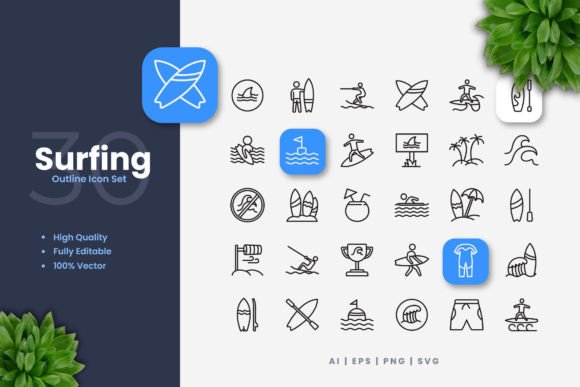
Essential Surfing Icons for Modern Digital Projects
The world of surfing is rich with iconic imagery: the wave crest, the surfboard, the palm tree lining the coast. Capturing that spirit in a digital project requires visuals that are both evocative and highly functional. Surfing Icons is a collection designed to do exactly that. It provides a set of simple, clean icon designs perfect for injecting a coastal or athletic vibe into websites, mobile apps, books, social media, infographics, flyers, print materials, banners, posters, and many more applications.
What Makes These Surfing Icons So Practical?
At its core, this set is a toolkit. Instead of static, fixed images, you receive 100 individual vector icons. Vector graphics are fundamentally different from regular photos or PNGs. They are built using mathematical paths, which means they are infinitely scalable. You can resize them to any dimension—from a tiny app button to a massive billboard poster—without any loss in quality or sharpness. The designs are intentionally simple and clean, ensuring they remain clear and recognizable even at very small sizes or when used in busy layouts.
The true value lies in customization. With the source files provided, you can open them in vector software like Adobe Illustrator or CorelDRAW. This allows you to change colors to match your brand palette, edit stroke weights to make lines thicker or thinner, and even tweak elements if you need a slight variation. This level of control is essential for professionals who need icons to integrate seamlessly into an existing design system.
Key Features for Creators and Professionals
Let’s look at what you actually get in the package. The set boasts high-quality design from the start, meaning each icon is crafted with attention to balance and clarity. All 100 icons are 100% vector and 100% customizable, giving you full ownership over their final appearance. The editable stroke feature is particularly useful; perhaps you want a more bold, graphic look for a poster, or a delicate line for a website footer—you can adjust it in minutes.
The practical delivery is also streamlined for an easy drag-and-drop workflow. The included files cover every common need:
- Source File (AI): The native Adobe Illustrator file for the deepest editing.
- EPS Version 10: A versatile vector format compatible with many professional programs, including CorelDRAW.
- SVG File: The modern standard for web development, allowing for crisp rendering on any screen.
- PNG Transparency: Ready-to-use raster files with transparent backgrounds for quick placement in documents or simple editors.
- Readme.txt: A straightforward guide to the files and their formats.
It’s important to note that any preview mockups shown in marketing are not part of the download; you receive the raw icon assets themselves.
Real-World Uses for Surfing Icons Across Industries
Who might benefit from this collection? The audience is broad. A small business owner running a surf shop or coastal cafe could use these icons on their website’s navigation bar, in their social media posts to highlight products, or on printed flyers for an upcoming event. The clean design ensures professionalism even if the owner isn’t a trained designer.
Bloggers or educators writing about marine sports, travel, or outdoor lifestyles can incorporate these icons into infographics to explain surfing techniques or illustrate blog post headers, making content more engaging. Freelancers and marketers crafting campaigns for clients in the tourism or athletic sectors will find the vector format indispensable for creating cohesive branding across digital ads (banners) and physical print (posters).
For app developers, the SVG files are perfect for interface elements. Imagine a weather app for beach towns using a wave icon to indicate surf conditions, or a fitness app using a surfboard icon to denote an activity type. The scalability ensures they look perfect on every device screen.
Important Considerations Before You Start
While the Surfing Icons set is designed for ease of use, having access to vector editing software like Illustrator or CorelDRAW is necessary to perform advanced customization like color changes or stroke edits. If you only plan to use the PNG files at their provided size, basic image editors will suffice. However, to unlock the full potential and truly make the icons your own, familiarity with a vector program is recommended. Many beginners can learn the basics of changing a color in these programs relatively quickly.
Also, think about your project's scope. The 100 icons offer a wide range of surfing-related concepts, but it’s always good to review the specific icon list to ensure it contains the symbols you need. Their simplicity makes them versatile, but they are stylistically consistent—they work best together or within projects that appreciate a clean, graphic aesthetic.
Why Simple and Clean Icon Design Matters
In today’s multi-platform world, your visuals need to adapt. A complex, detailed illustration might lose its meaning when shrunk for a mobile app icon. The simple and clean philosophy behind these Surfing Icons prioritizes communication over decoration. This approach supports quick recognition, reduces visual clutter, and ensures the icons serve their primary purpose: to convey a concept or action instantly. Whether your goal is to enhance user experience on a website, add visual interest to a printed brochure, or create a recognizable brand element for social media, this foundational design principle is a significant advantage.
Ultimately, this collection is more than just pictures of surfboards. It’s a flexible, professional-grade asset that empowers creators, entrepreneurs, and professionals to bring a touch of the surf culture to their work with efficiency and consistency. By starting with high-quality vectors, you ensure your projects—from a hobbyist’s blog to a corporate marketing campaign—maintain a polished, cohesive look wherever they appear.