The Technology Support Icon Pack: A Designer's Swiss Army Knife
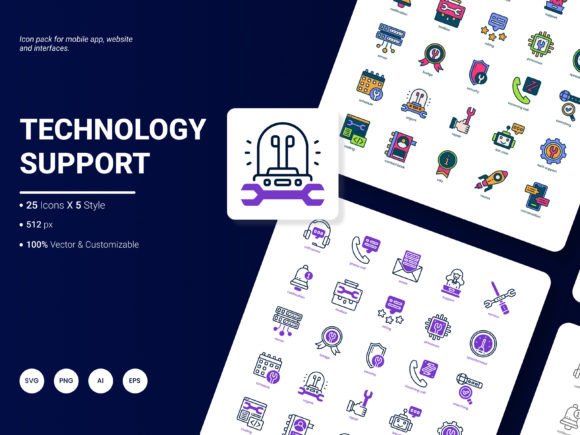
Every time you design a website, put together a presentation, or craft an infographic, you face a common hurdle: how to visually represent concepts like cloud storage, cybersecurity, or customer support without spending hours searching for the right graphic. The Technology Support Icon Pack is built specifically to solve that problem. It’s a curated collection of 125 stylish icons that act as a visual shorthand for the most popular services and ideas in the tech and support space.
Where These Icons Come Into Play
You might think an icon pack is just for websites, but its utility stretches far beyond a homepage. Consider the freelance web designer who needs to mock up a client’s SaaS platform dashboard. Instead of sketching placeholder boxes, they can drop in precise icons for "API," "Database," and "Live Chat" to make the prototype feel functional and professional from the first glance. The icons communicate structure and features instantly, speeding up client feedback and approval.
For a marketer building an analytical report, a simple PNG icon of a "Server" or "Data Shield" next to a key metric does more than decorate the page. It anchors the data in a recognizable concept, making complex information more digestible for stakeholders or team members who aren’t technically inclined. The visual cue helps them understand the context without needing a lengthy text explanation.
Beyond the Screen: Flexibility in Format and Use
The true test of a digital asset is how easily it fits into your workflow. This pack passes that test by being available in multiple file formats—AI, EPS, SVG, PNG, PDF, and JPG. This variety is crucial for different scenarios. The SVG files, for example, are vector-based, meaning they can scale to any size without losing quality, perfect for a responsive website that needs crisp icons on both mobile and desktop views. The AI and EPS formats are editable gold for a graphic designer who wants to tweak a color to match a brand’s exact palette or combine elements into a unique composite icon.
Imagine a small business owner creating a flyer for their IT support services. They can open the PDF, extract a clean PNG icon of "Network Setup," and place it directly into their simple design software. The editable nature means they aren’t locked into a predetermined look; they can adapt the resource to their immediate need.
Real-World Applications Across Professions
Let’s walk through a few concrete situations. An educator developing an online course module about cybersecurity can use icons representing "Firewall," "Encryption," and "Phishing" to create visually engaging slide decks. These symbols break up text-heavy content and provide mnemonic anchors for students, enhancing learning retention.
A blogger writing about productivity tools might embed a subtle "Cloud Sync" icon within their article to visually highlight a section discussing file backup solutions. It adds a professional, polished touch to their content without requiring design expertise.
For an entrepreneur pitching a new app idea, a presentation deck populated with trendy, coherent icons for "User Profile," "Mobile App," and "Payment Gateway" signals preparedness and attention to detail. It shows they’ve thought about the user interface and feature set visually, which can build confidence with potential investors or partners.
What Makes This Set a Practical Choice
The pack’s value isn’t just in the number of icons—it’s in their relevance. It focuses on "popular services and ideas," meaning you’re likely to find the symbol you need without sifting through hundreds of irrelevant graphics. The five included styles offer aesthetic flexibility. You might use a minimalist outline style for a clean tech blog and a more filled, bold style for a vibrant startup homepage.
Because the icons are designed to be fresh and trendy, they help your projects feel current. Using outdated or generic graphics can subtly make a digital product seem stale. This pack helps avoid that pitfall, keeping the visual language aligned with contemporary design expectations.
Considering Before You Use
Before integrating any icon pack, it’s wise to assess your specific needs. Think about the primary medium: are you mostly working in web (where SVG is ideal), print (where high-resolution PNG or PDF matters), or editable design files (where AI/EPS are key)? The multi-format offering here covers those bases, but confirming your main use case ensures you download the right files.
Also, consider the scope of your project. If you’re designing a full website dedicated to tech services, the breadth of 125 icons will be a significant asset. If you only need two or three icons for a single document, you still benefit from the cohesive design style—all icons share a visual family, so using a subset still looks unified and professional.
Finally, the pack’s nature as an editable, flexible resource means it’s a long-term investment. Unlike a static image you use once, these icons can be modified and repurposed for future projects, from a mobile application UI to a printed manual template. They become a part of your design toolkit, ready to deploy whenever you need to communicate a tech or support concept quickly and effectively.
A Resource That Evolves with You
The creators invite suggestions for what to include in future updates. This is a noteworthy point because the tech landscape changes. New services and concepts emerge. This open channel means the pack can grow to include icons for evolving trends, ensuring its longevity as a useful resource. It’s not a static product but one that can adapt, much like the technology it represents.
In essence, the Technology Support Icon Pack is more than a folder of graphics. It’s a practical solution for anyone who needs to communicate tech-related ideas visually, saving time, ensuring consistency, and elevating the professionalism of their work across countless real-world applications.