Elevate Your Design Projects with the Kitchen Appliance Icon Pack
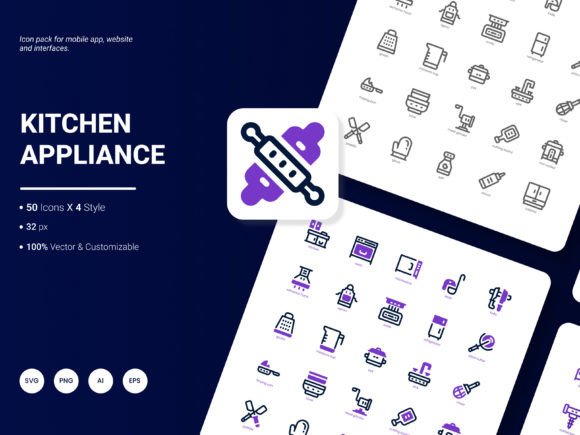
When creating digital content for kitchens, food services, or domestic projects, visual communication is key. A well-chosen icon can convey a concept instantly, saving text space and enhancing user experience. The Kitchen Appliance Icon Pack is a curated set of 200 stylish icons designed for this exact purpose. It showcases popular services and ideas—from blenders and coffee makers to scales and microwaves—in a fresh, trendy aesthetic. This pack isn't just a collection of images; it's a versatile toolkit for website design, mobile applications, presentations, analytical reports, infographics, and templates.
Common Oversights When Choosing Icon Sets
Many creators rush to download an icon pack based solely on its quantity or immediate style appeal. This often leads to frustration later in a project. For instance, you might find an icon that looks perfect on the pack's preview page, but discover it doesn't scale well or lacks the necessary detail for your report. A frequent misunderstanding is assuming all icons in a pack share the same visual weight and stylistic consistency. Without checking, you can end up with a handful of icons that feel mismatched when used together, undermining your design's professionalism.
Another overlooked detail is format support. If you only download PNG files because they're easy to insert, you might lock yourself out of future edits. When a client requests a color change or you need to integrate the icon into a complex SVG animation, starting over with a new asset costs time and money. The Kitchen Appliance Icon Pack avoids this by providing icons in six versatile formats: AI, EPS, SVG, PNG, PDF, and JPG. This ensures you have the right file for any stage of your workflow, from raw editing to final deployment.
Practical Advice Before You Download or Purchase
Always review the specific formats and styles included. This pack offers four distinct styles, which means you can maintain visual coherence across different projects—a minimalist style for a clean app interface, a more detailed one for a printed brochure. Before committing, ask yourself: Do I need editable vectors for brand customization? Are the icons recognizable at small sizes for a mobile UI? Scrolling through the full set to spot any gaps in content relevant to your niche is a step worth taking. For example, if you're designing for a high-end coffee blog, ensure the coffee-related icons meet your quality threshold.
Avoiding Integration Pitfalls
A major mistake is treating icons as mere decoration rather than functional communication tools. Placing a complex, detailed icon from this pack into a tiny footer space can render it unreadable. Conversely, using a simple line-style icon as the main graphic on a large hero section might make it feel underwhelming. The effect is a confused user and a diluted message. The corrective approach is to plan your icon use hierarchically. Use larger, more detailed icons for primary calls-to-action, and simpler, robust icons for secondary navigation or list items.
Integration also suffers when color choices are ignored. These icons are easily edited, but many users don't leverage this. Using the default colors might clash with your established brand palette. A better method is to briefly open the AI or SVG file and adjust the fill colors to match your theme. This simple step, often skipped due to perceived time constraints, dramatically increases the pack's value and your project's cohesion. It transforms a generic asset into a bespoke design element.
Ensuring Long-Term Value and Efficiency
The promise of 200 icons is substantial, but without organization, it can lead to inefficiency. A common error is dumping all 200 files into a single folder and then wasting time searching for "the kettle icon" later. To avoid this, upon downloading the Kitchen Appliance Icon Pack, take ten minutes to sort the icons into subfolders by category (e.g., "Baking," "Beverage," "Cleaning"). This simple act pays dividends throughout your project lifecycle, saving you hours and reducing creative friction.
Also, consider future scalability. If you're designing a website for a kitchen appliance retailer, using diverse icons from this pack for different product categories creates a consistent visual language. However, ensure you have icons for all planned categories. If the pack lacks an icon for a "smart oven" and your client adds that product line next year, you'll need a compatible icon. Thinking ahead about content gaps can inform your choice to supplement this pack or request specific additions from the creator.
Maximizing the Pack Across Different Media
Professionals sometimes underutilize multi-format assets. Using the same PNG icon for a website, a PDF report, and a printed flyer often results in quality loss in some mediums. The Kitchen Appliance Icon Pack provides specialized formats for each use case. For instance, use the vector-based AI or EPS files for print materials to ensure crisp edges at any size. Use the SVG for web development to allow for CSS interactivity and smooth scaling. Use the high-resolution PNG for quick placement in presentation slides. Matching the format to the output medium is a mark of professional execution that affects final quality and client satisfaction.
For entrepreneurs and marketers creating templates or infographics, the editable nature of these icons is a powerhouse feature. A misunderstanding is that editing requires advanced design software. While AI files need Adobe Illustrator, the SVG and EPS formats can be opened in many free or lower-cost vector programs. This accessibility means you can tailor icons to your specific infographic theme without needing the original designer. An example: You could modify the color and outline of a mixer icon to match a specific data section in your annual report, strengthening the visual narrative.
Your Checklist for Smart Implementation
Before you finalize your design project using this icon pack, run through this quick list:
- Style Consistency: Have you used icons from one of the pack's four coherent styles throughout your project?
- Format Correctness: Are you using the vector formats (AI, EPS, SVG) for editable master files and the raster formats (PNG, JPG, PDF) for specific fixed-size outputs?
- Color Adaptation: Have you adjusted the icon colors to align with your brand, rather than using the defaults?
- Recognizability Test: At the smallest size you'll use, is the icon's concept still clear?
- Organization: Are the icon files sorted so you can find them efficiently for future projects?
Contributing to the Next Evolution
The creators of the Kitchen Appliance Icon Pack invite suggestions for future updates. This is an opportunity many users miss. If you find the pack incredibly useful but need an icon for a modern air fryer or a specific kitchen gadget, sharing that feedback directly helps expand the library in practical directions. Instead of simply moving to another pack when you encounter a gap, a constructive approach is to communicate your needs. This not only potentially improves the tool you already own but also benefits the wider community of designers, educators, and bloggers who rely on these visual assets.
Think about trends in kitchen technology and wellness. Perhaps icons for smart kitchen integrations, sustainable cooking tools, or specific international appliances could enhance the pack's relevance. Your practical experience using these icons in real projects is the best guide for what should come next. Sharing your suggestions ensures the resource grows in a way that is truly helpful, keeping it fresh and trend-responsive for years to come.